



Construa um Jogo Tetris com Arduino Nano em Matriz LED 16×8 DIY
Componentes e Materiais
| Componente | Quantidade |
|---|---|
| Arduino Nano R3 | 1 |
| Chave Pushbutton 12 mm (SparkFun) | 4 |
| Shift Register Serial-para-Paralelo 74HC595 (Texas Instruments) | 2 |
| Chave Deslizante (Slide Switch) | 1 |
| LED 5 mm Amarelo | 128 |
Ferramentas Necessárias
- Ferro de solda (genérico)
Aplicativos e Serviços Online
- Arduino IDE
Sobre o Projeto
Construí este jogo Tetris com matriz LED 16x8 caseira, Arduino Nano e dois registradores de deslocamento 74HC595. Adicionei bip sonoro ao pressionar qualquer botão.
Código
/* Author: Jae Yeong Bae UBC ECE jocker.tistory.com
   Date: Jan.18.2013  File: Tetris v2
   Changelog: v2: exibe score no gameover
   Purpose: matar tempo.. + diversão
   Circuits+Pins:
   Led Matrix: 2x 74HC595 Shift Registers (ordem: Green,Blue,Red)
   pins: Latch = 3, Clock = 2, Data = 4
   Row Anodes = 5 a 13 (8 pinos) compartilhados entre ambas matrizes
   buttons (as digital): A4=left, A5=down, A6=right, A7=up (rotate)
*/

unsigned char latchPin = 3, clockPin = 2, dataPin = 4, rowPin = 5;
long delays = 0; short delay_ = 500;
long bdelay = 0; short buttondelay = 150, btdowndelay = 30, btsidedelay = 80;
unsigned char blocktype, blockrotation;
int lines = 0;
boolean block[8][18], pile[8][16], disp[8][16];
boolean lib[10][5][7];

void setup() {
  // Inicializa biblioteca de formas dos blocos (lib)
  lib[0][1][0]=1; lib[0][2][0]=1; lib[0][3][0]=1; lib[0][0][1]=1; lib[0][4][1]=1;
  lib[0][3][2]=1; lib[0][0][2]=1; lib[0][4][2]=1; lib[0][2][3]=1; lib[0][0][3]=1;
  lib[0][4][3]=1; lib[0][1][4]=1; lib[0][0][4]=1; lib[0][4][4]=1; lib[0][0][5]=1;
  lib[0][4][5]=1; lib[0][1][6]=1; lib[0][2][6]=1; lib[0][3][6]=1;
  // ... (demais blocos 1-9 inicializados similarmente)

  int seed = (analogRead(0)+1)*(analogRead(1)+1)*(analogRead(2)+1)*(analogRead(3)+1);
  randomSeed(seed); random(10,9610806);
  seed = seed * random(3336,15679912) + analogRead(random(4));
  randomSeed(seed); random(10,98046);

  cli(); // stop interrupts
  // Timer1 a 2 kHz
  TCCR1A = 0; TCCR1B = 0; TCNT1 = 0;
  OCR1A = 259; // (16*10^6)/(2000*64)-1
  TCCR1A |= (1 << WGM01); // CTC mode
  TCCR1B |= (1 << CS12) | (1 << CS10); // prescaler 1024
  TIMSK1 |= (1 << OCIE0A); // enable timer compare interrupt
  sei(); // allow interrupts

  pinMode(latchPin, OUTPUT); pinMode(clockPin, OUTPUT); pinMode(dataPin, OUTPUT);
  pinMode(A7, INPUT); pinMode(A6, INPUT); pinMode(A5, INPUT); pinMode(A4, INPUT);
  for(int i=0;i<8;i++) pinMode(rowPin+i, OUTPUT);
  newBlock(); updateLED(); Serial.begin(9600);
}

void loop() {
  if (delays < millis()) { delays = millis() + delay_; movedown(); }
  int button = readBut();
  if (button == 1) rotate();
  if (button == 2) moveright();
  if (button == 3) moveleft();
  if (button == 4) movedown();
}

boolean moveleft() {
  if (space_left()) {
    for(int i=0;i<7;i++) for(int j=0;j<16;j++) block[i][j]=block[i+1][j];
    for(int j=0;j<16;j++) block[7][j]=0;
    updateLED(); return 1;
  } return 0;
}

boolean moveright() {
  if (space_right()) {
    for(int i=7;i>0;i--) for(int j=0;j<16;j++) block[i][j]=block[i-1][j];
    for(int j=0;j<16;j++) block[0][j]=0;
    updateLED(); return 1;
  } return 0;
}

int readBut() {
  if (bdelay > millis()) return 0;
  if (analogRead(A4) > 500) { bdelay = millis() + btsidedelay; return 3; } // left
  if (analogRead(A5) > 500) { bdelay = millis() + btdowndelay; return 4; } // down
  if (analogRead(A6) > 500) { bdelay = millis() + btsidedelay; return 2; } // right
  if (analogRead(A7) > 500) { bdelay = millis() + buttondelay; return 1; } // up
  return 0;
}

void updateLED() {
  for(int i=0;i<8;i++) for(int j=0;j<16;j++) disp[i][j] = block[i][j] | pile[i][j];
}

void rotate() {
  if (blocktype == 3) return; // quadrado não rotaciona
  // ... (lógica complexa de rotação por tipo de bloco, com verificações de espaço)
  // O código original contém rotação detalhada para cada um dos 7 tipos de tetriminós
  // com ajustes de posição (xi, yi) e testes space_left/right/2/3.
  // Se rotação causar sobreposição com pile, empurra linhas para cima.
  updateLED();
}

void movedown() {
  if (space_below()) {
    for(int i=15;i>=0;i--) for(int j=0;j<8;j++) block[j][i] = block[j][i-1];
    for(int i=0;i<7;i++) block[i][0] = 0;
  } else {
    for(int i=0;i<8;i++) for(int j=0;j<16;j++)
      if (block[i][j]) { pile[i][j]=1; block[i][j]=0; }
    newBlock();
  }
  updateLED();
}

boolean check_overlap() {
  for(int i=0;i<16;i++) for(int j=0;j<7;j++)
    if (block[j][i] && pile[j][i]) return false;
  for(int i=16;i<18;i++) for(int j=0;j<7;j++)
    if (block[j][i]) return false;
  return true;
}

void check_gameover() {
  for(int i=15;i>=0;i--) {
    int cnt=0;
    for(int j=0;j<8;j++) if (pile[j][i]) cnt++;
    if (cnt == 8) {
      lines++;
      for(int j=0;j<8;j++) pile[j][i]=0;
      updateLED(); delay(50);
      for(int k=i;k>0;k--) for(int j=0;j<8;j++) pile[j][k] = pile[j][k-1];
      for(int j=0;j<8;j++) pile[j][0] = 0;
      updateLED(); delay(50); i++;
    }
  }
  for(int i=0;i<8;i++) if (pile[i][0]) gameover();
}

void gameover() {
  // Animação "fecha cortina"
  for(int i=0;i<8;i++) for(int j=0;j<16;j++) {
    if (j%2) disp[i][j]=1; else disp[7-i][j]=1;
    delay(60);
  }
  // Mostra score (linhas completadas) com dígitos da lib
  // Animação "abre cortina" com score
  // Loop infinito rolando score
}

void newBlock() {
  check_gameover();
  blocktype = random(7);
  blockrotation = 0;
  // Inicializa posição do bloco conforme tipo (0-6)
  // ... (código omitido por brevidade; cada tipo define 4 células em block[][])
}

boolean space_below() {
  for(int i=15;i>=0;i--) for(int j=0;j<8;j++)
    if (block[j][i]) { if (i==15) return false; if (pile[j][i+1]) return false; }
  return true;
}

// Funções auxiliares space_left, space_right, space_left2, space_right2, space_left3, space_right3
// verificam colisão lateral com margens de 1, 2 ou 3 colunas.

ISR(TIMER1_COMPA_vect) { LEDRefresh(); }

void LEDRefresh() {
  // Correção de pinout de soldagem (12345670 vs 01234567)
  boolean tmpdisp[8][16];
  for(int k=0;k<16;k++) {
    for(int i=1;i<8;i++) tmpdisp[i][k]=disp[i-1][k];
    tmpdisp[0][k]=disp[7][k];
  }
  for(int i=0;i<8;i++) {
    int j = (i==0) ? rowPin+7 : rowPin+i-1;
    byte upper=0, lower=0;
    for(int b=0;b<8;b++) { upper <<= 1; if (!tmpdisp[b][i]) upper |= 1; }
    for(int b=0;b<8;b++) { lower <<= 1; if (!tmpdisp[b][i+8]) lower |= 1; }
    digitalWrite(j, LOW);
    digitalWrite(latchPin, LOW);
    shiftOut(dataPin, clockPin, LSBFIRST, lower);
    shiftOut(dataPin, clockPin, LSBFIRST, upper);
    digitalWrite(latchPin, HIGH);
    digitalWrite(rowPin+i, HIGH);
    delay(1);
  }
  digitalWrite(rowPin+7, LOW);
}
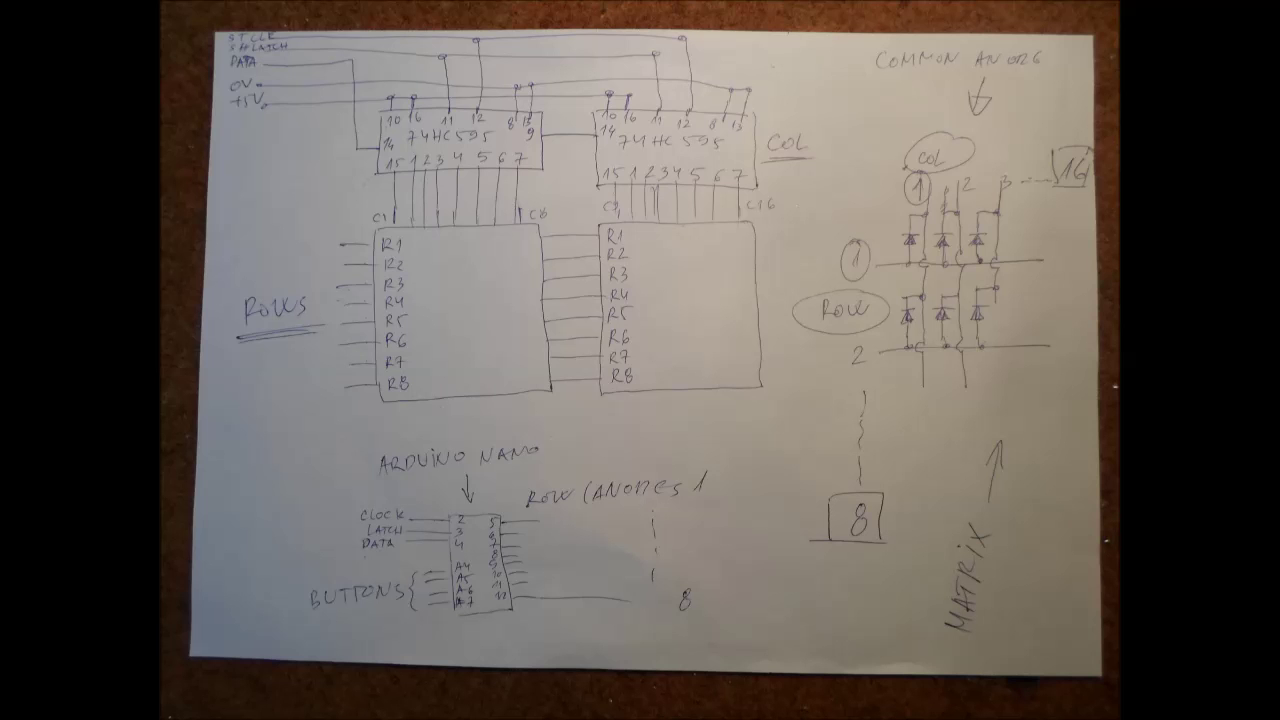
Esquemático
Construa um Estadiómetro Digital: Acompanhe a Altura com Arduino e Sensor a Laser
Construa um Pote Inteligente IoT com ESP8266, Arduino e Sensor Ultrassônico – Monitoramento em Tempo Real
Processo de manufatura
- Construa um Jogo em Tempo Real com Giroscópio: Arduino Nano + Sensor MPU-6050
- Dados Digital com Arduino: Gere Números Aleatórios 1-6 em LCD 16x2
- DIY Arduino TV B-Gone: Controle Remoto Universal para Todas as TVs
- Controle USB para Jogos DIY com Arduino – Construa Seu Próprio Gamepad de Alto Desempenho
- Construa um Console Pong 24×16 LED com Arduino Nano e MAX7219
- Pixel Chaser: Jogo LED Interativo de Um Toque com Arduino Nano
- Relógio Flip Arduino com Matriz LED 8×8 – Projeto DIY de Relógio em Tempo Real
- Jogo Pong Neon em Matriz NeoPixel com Arduino Nano
- Contador Geiger Portátil com Arduino Nano: Construa o Seu
- Never Ride Alone: Sistema Inteligente de Segurança para Ciclistas